
Roles
Utopia Server Panel uses a role-based three-level permission model. Every panel account belongs to a role, while unauthenticated visitors use the built-in guest role for permission checks.
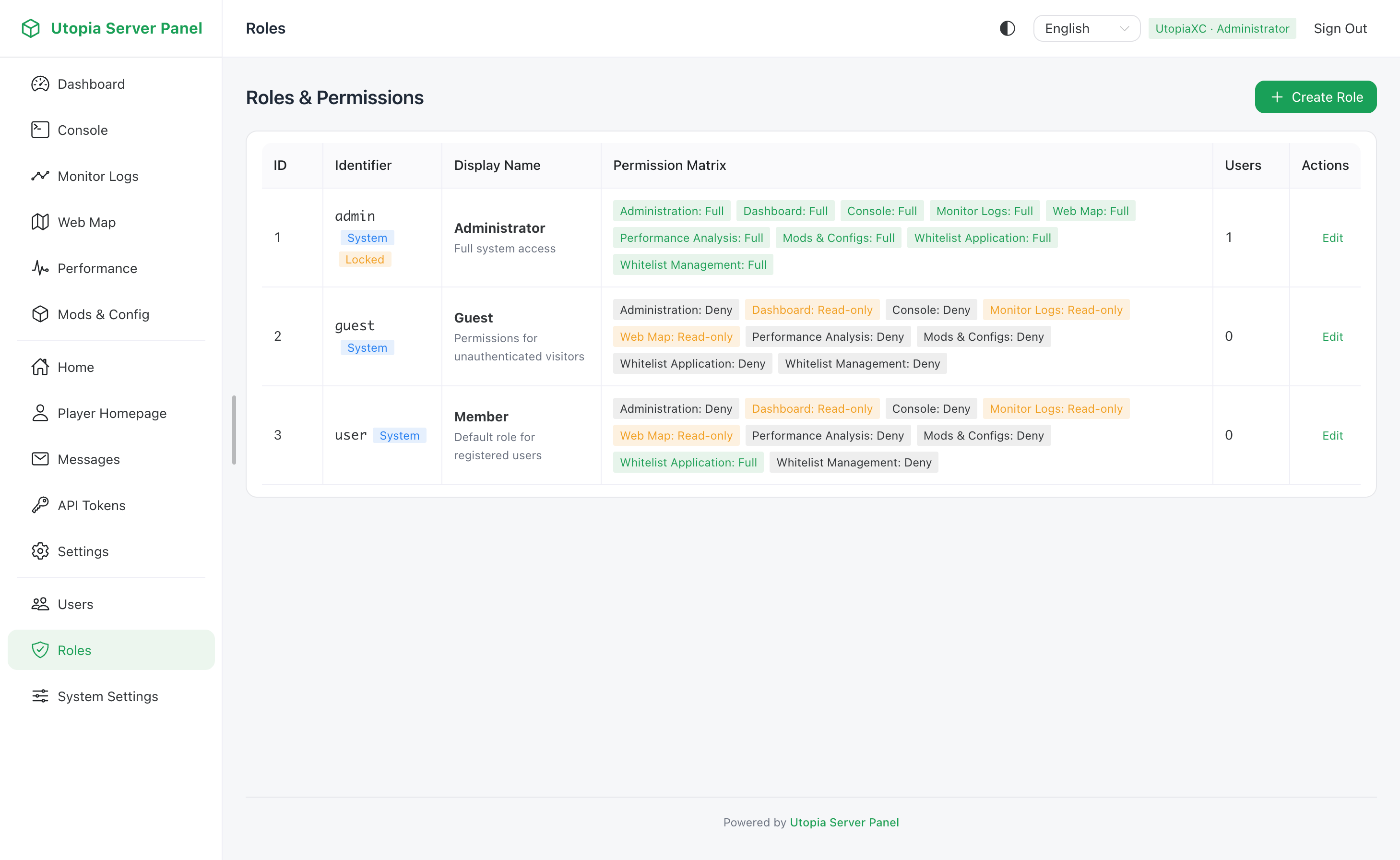
Permission Levels
Every module permission in the system supports the following three levels:
| Level | Name | Meaning |
|---|---|---|
0 | deny | Access to the corresponding API endpoints and pages is blocked, and sidebar entries are hidden |
1 | readonly | Allows viewing pages and real-time data without write, edit, or control actions |
2 | full | Grants full view and management access for the module |
Permission Modules
The system includes 9 built-in permission keys:
| Key | Module | Read-Only Scope | Full Scope |
|---|---|---|---|
dashboard | Dashboard | View live server status, TPS, MSPT, and system resources | Same as read-only |
terminal | Console | Stream live server console logs and view command history | Execute commands in the server console |
logs | Monitoring Logs | Query historical performance logs, player events, and server lifecycle records | Same as read-only |
map | Web Minimap | View enabled map layers and markers allowed for read-only users | Create or delete personal waypoints and use advanced features such as teleportation |
profiler | Performance Profiler | Inspect top tick-time chunk and dimension hotspot statistics | Teleport in-game to hotspot coordinates |
mods_config | Mods & Server Config | Browse installed mods and view mod configs and server.properties in read-only mode | Edit and save mod configs, update server.properties, and trigger server restarts |
whitelist_apply | Whitelist Application | Visit the public whitelist application page and check status | Submit whitelist applications |
whitelist_manage | Whitelist Management | View the application queue and current server whitelist entries | Review applications and manually add or remove whitelist entries |
admin | Administration | View users, roles, system settings, and database overview | Create or edit users and roles, modify system settings, and clear map cache |
Built-in System Roles
After initialization, the database seeds three built-in roles:
| Role ID | Name | Description | Default Permissions |
|---|---|---|---|
1 | admin | Administrator | Immutable and cannot be deleted; all permissions are fixed at 2 |
2 | guest | Guest | Controls visibility for unauthenticated visitors; defaults to dashboard and map at 1, whitelist_apply at 2, others 0 |
3 | user | Member | Default role for newly registered accounts; defaults to dashboard, logs, and map at 1, whitelist_apply at 2, others 0 |
Administrators can create custom roles tailored to server operations, such as a moderator role with whitelist_manage and terminal access. If any users are still assigned to a custom role, the system prevents deleting that role until those users are reassigned.
Related Settings
- Under System Settings -> Panel Settings -> Registration & Binding, you can configure
defaultRegisterRoleIdto control which role newly registered users receive. - Under System Settings -> In-Game Integration -> Whitelist, toggling Allow Guest Whitelist Applications automatically updates the
whitelist_applylevel on theguestrole. - Fine-grained minimap layer visibility can be configured per capability under System Settings -> Panel Features -> Web Map, as described in Web Minimap.